> For the complete documentation index, see [llms.txt](https://usermanuals.geojit.com/llms.txt). Markdown versions of documentation pages are available by appending `.md` to page URLs; this page is available as [Markdown](https://usermanuals.geojit.com/fundsgenie-mobile/dashboard/tools-and-calculator.md).
# Tools and Calculator
Explore our financial tools and calculators to estimate investment growth, plan future goals, assess retirement needs, and make smarter wealth-building decisions with confidence.
* Log in to FundsGenie.
* You will land on the **'Dashboard'** page by default.
* Scroll down to find **'Tools and Calculators.'**
SIP Calculator
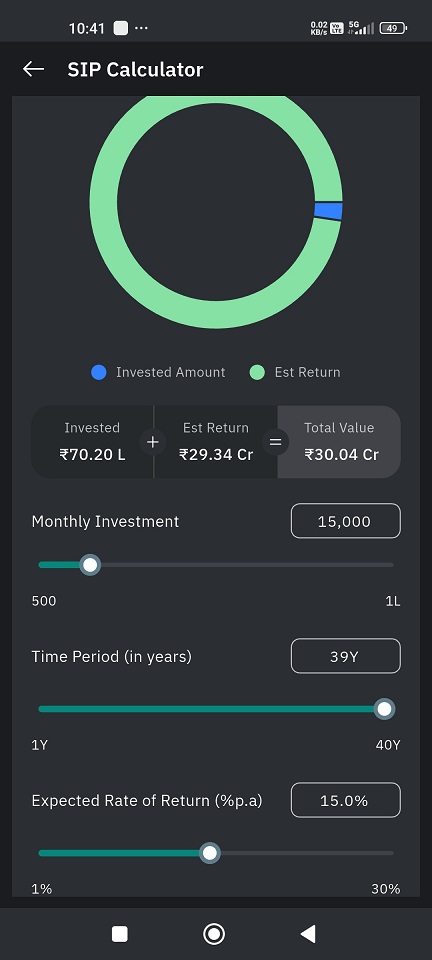
The SIP Calculator helps you **estimate the potential value of your Systematic Investment Plan (SIP)** over a selected time period based on an assumed rate of return.\
It shows how regular monthly investments can grow over time through compounding.
* Go to '**Dashboard**'.
* Scroll down to find '**Tools and Calculators**'.
* Tap on **'SIP'** calculator.
* When the calculator opens, the following **default values** are shown:
* **Monthly SIP Amount:** ₹15,000
* **Investment Time Period:** 15 years
* **Expected Return Rate:** 15% p.a.
These values are **for illustration purposes only** and can be modified.
* For all input fields in this calculator:
* You can either:
* Use the **slider**, or
* **Manually enter** the value
* Entered values must be within the **minimum and maximum range shown**
* The selected value is displayed clearly above the slider
* Any change made updates the calculation **instantly**
#### Step-by-Step Process
#### Step 1: Enter Monthly SIP Amount
* Enter the amount you plan to invest **every month**
* This represents your regular SIP contribution
#### Step 2: Select Investment Time Period
* Select the **number of years** you plan to continue the SIP
* This also represents **how long you intend to stay invested** for this calculation
#### Step 3: Set Expected Return Rate
* Enter the **expected annual rate of return (%)**
* This is an **assumed rate** used only for estimation
#### Understanding the Results
The circular chart and figures below display:
* **Invested Amount** – Total amount invested over the SIP period
* **Estimated Return** – Indicative gains based on assumed returns
* **Total Value** – Sum of invested amount and estimated return
These values **change dynamically** as you adjust the inputs.
#### Important Notes
* Returns shown are **indicative and not guaranteed**
* The calculator does not predict actual market performance
* SIP returns may vary depending on market conditions
* This tool is meant for **planning and awareness purposes only**
Cost of Delay
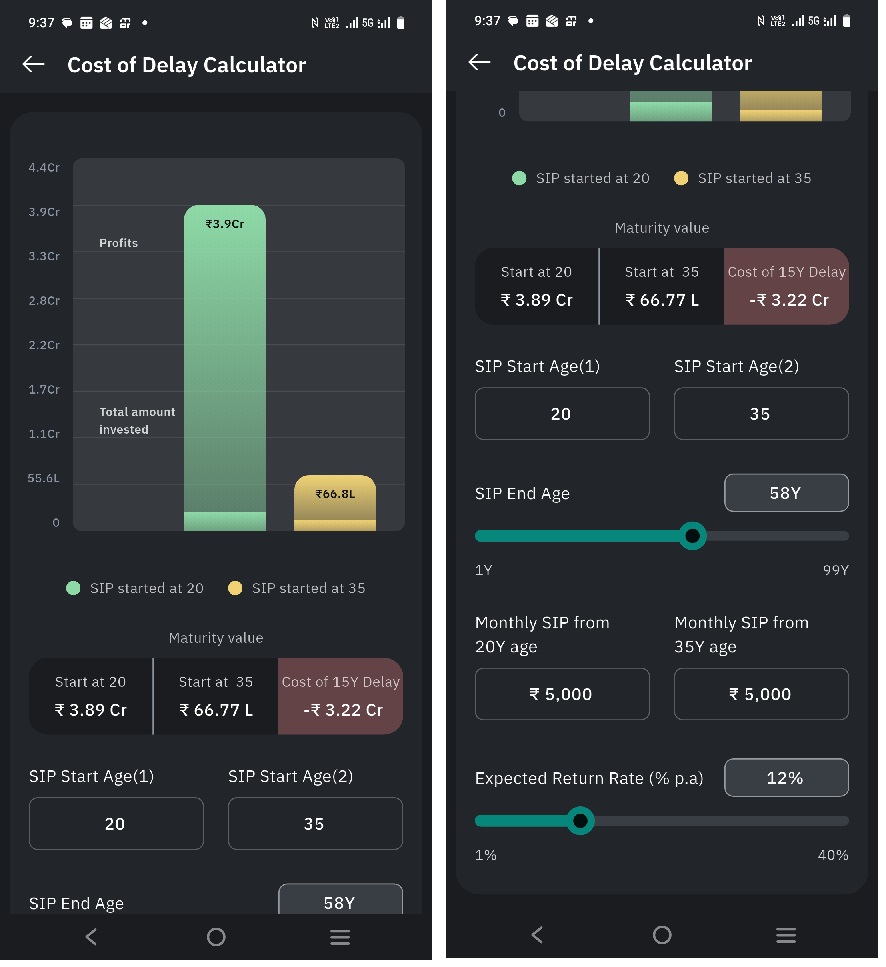
The Cost of Delay Calculator helps you **understand the financial impact of delaying your SIP investments**. It compares the potential outcomes of **starting a SIP earlier versus starting later**, and highlights how even a few years of delay can affect long-term wealth creation.
* Go to '**Dashboard**'.
* Scroll down to find '**Tools and Calculators**'.
* Tap on **'Cost of Delay'** calculator.
* When the calculator opens, the following **default values** are pre-filled:
* **Age 1 (Early Start):** 20 years
* **Age 2 (Delayed Start):** 35 years
* **SIP End Age:** 60 years
* **Monthly SIP Amount (Both Scenarios):** ₹5,000
* **Expected Return Rate:** 12% p.a.
These default values are **only for illustration** and can be modified.
#### Step-by-Step Process
#### Step 1: Select SIP Start Ages
* Enter **Age 1**, the age at which SIP should have started.
* Enter **Age 2**, the age at which SIP is started after a delay.
* Both ages must fall within the permissible range displayed
#### Step 2: Select SIP End Age
* Choose the age until which SIP investments are continued
* This represents the **investment horizon** for both scenarios
#### Step 3: Enter Monthly SIP Amounts
* Enter the **monthly SIP amount for the early-start scenario**
* Enter the **monthly SIP amount for the delayed-start scenario**
* These are treated as **two separate SIPs**
* The SIP amounts **can be the same or different** for each scenario
> By default, both SIP amounts are set to **₹5,000** for comparison.
#### Step 4: Set Expected Return Rate
* Enter the expected annual rate of return
* This rate is **assumed only for calculation purposes**
#### Cost of Delay Insight
The calculator highlights:
* **Cost of Delay** – the difference in maturity value caused by starting the SIP later
* **Catch-Up Gain** – the incremental wealth generated by increasing the SIP amount in the delayed-start scenario
Together, these help you **evaluate the trade-off between starting early and investing more later**.
#### What is Catch-Up Gain?
**Catch-Up Gain** refers to the **additional wealth generated by increasing the SIP amount when you start investing later**, compared to continuing with the original SIP amount.
It helps you understand **how much increase in SIP may be required to reduce or offset the impact of delay**.
**Key Clarifications:**
* Catch-up gain represents **incremental wealth**, not guaranteed profit
* It is an **illustrative measure**, not a recommendation
* Increasing SIP may reduce the gap but may not fully eliminate it
#### Understanding the Comparison
The calculator compares two scenarios:
* **SIP Started Earlier (Age 20)**
* **SIP Started Later (Age 35)**
For each scenario, it displays:
* **Total Amount Invested**
* **Estimated Profits**
* **Maturity Value**
#### Important Notes
* Calculations are based on **assumed return rates**
* Results are **indicative and for planning purposes only**
* Actual market returns may differ
* This tool does not provide investment advice or recommendations
Step Up SIP
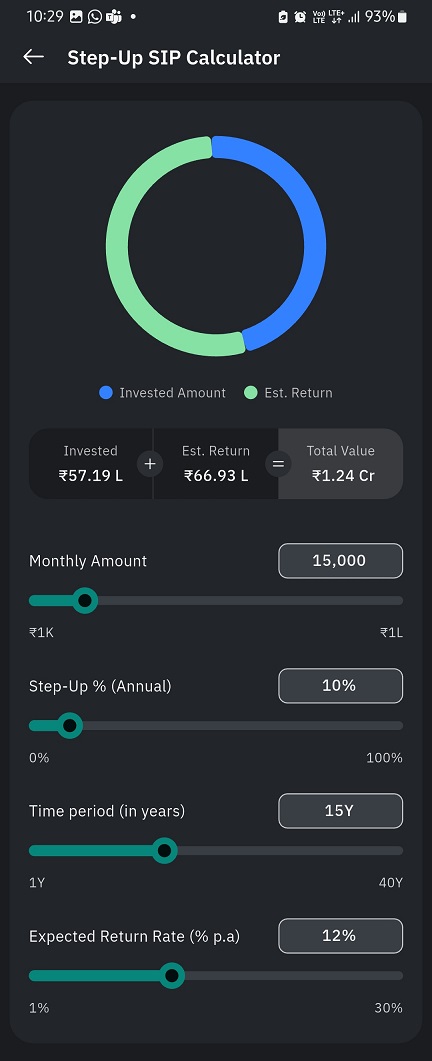
The Step-Up SIP Calculator helps you estimate the **potential future value of your investments** when you increase your SIP amount every year by a fixed percentage (step-up). It helps you understand how gradually increasing your SIP may impact long-term wealth creation.
* Go to '**Dashboard**'.
* Scroll down to find '**Tools and Calculators**'.
* Tap on '**Step Up SIP**' calculator.
* When the calculator opens, the following **default values** are prefilled for illustration:
* **Monthly SIP Amount:** ₹15,000
* **Annual Step-Up:** 10%
* **Investment Period:** 15 years
* **Expected Return Rate:** 12% p.a.
* For all inputs in this calculator:
* You can **either use the slider or manually enter values**
* Entered values must be **within the minimum and maximum range displayed**
* All calculations update automatically based on the inputs provided
#### Step-by-Step Process
#### Step 1: View the Investment Summary
* A visual ring chart shows:
* **Invested Amount**
* **Estimated Return**
* Below the chart, the following figures are displayed:
* **Invested Amount**
* **Estimated Return**
* **Total Value** (Invested Amount + Estimated Return)
These figures are initially shown based on the **default illustrative values** and update automatically when inputs are changed.
#### Step 2: Set Monthly SIP Amount
* Select the monthly SIP amount you plan to invest
#### Step 3: Choose Annual Step-Up Percentage
* Select the percentage by which your SIP amount increases every year
#### Step 4: Select Investment Time Period
* Select the **SIP duration**, i.e., the number of years you plan to continue investing through SIP
* This also represents **how long you intend to stay invested** for the purpose of this calculation
#### Step 5: Enter Expected Return Rate
* Enter an assumed annual rate of return for calculation purposes
#### Step 6: Review Calculated Results
* As inputs are modified, the calculator updates:
* **Invested Amount**
* **Estimated Return**
* **Total Value**
* The chart visually reflects the proportion between investment and estimated returns
No investment order or transaction is placed from this screen
Systematic Withdrawal Plan
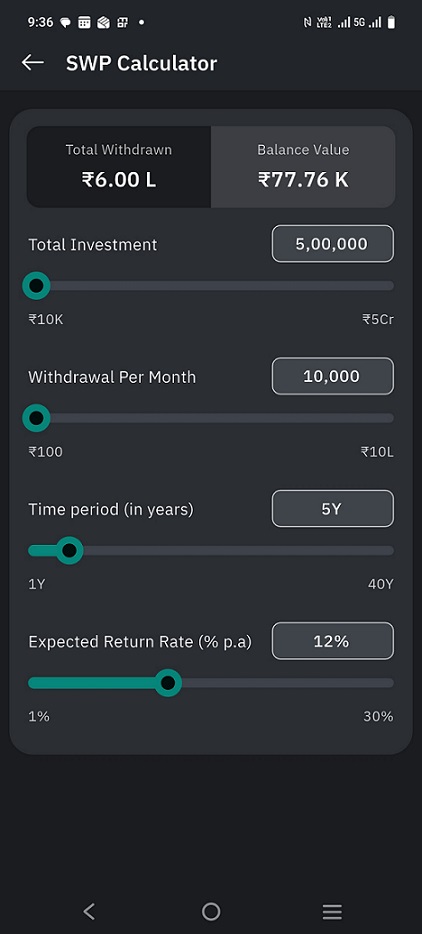
The **SWP (Systematic Withdrawal Plan) Calculator** helps you estimate how long your investment may last when you withdraw a fixed amount regularly.\
It shows the **total amount withdrawn** and the **remaining balance value** based on your investment amount, withdrawal rate, time period, and expected return.
This calculator is for **illustration purposes only** and does not guarantee actual returns.
* Go to '**Dashboard**'.
* Scroll down to find '**Tools and Calculators**'.
* Tap on **'SWP'** calculator.
* When the calculator opens, the following **default values** are pre-filled:
* **Total Investment:** ₹5,00,000
* **Monthly Withdrawal:** ₹10,000
* **Time Period:** 5 years
* **Expected Return Rate:** 12% p.a.
These default values are **only for illustration** and can be changed.
* For all input fields in this calculator:
* You can either:
* Use the **slider**, or
* **Manually enter** the value
* Entered values must remain within the **minimum and maximum range shown**
* Any change made updates the calculation **instantly**
#### Step-by-Step Process
#### Step 1: Enter Total Investment Amount
* Specify the total amount invested before starting withdrawals
* This represents the initial corpus used for the SWP calculation
#### Step 2: Set Monthly Withdrawal Amount
* Enter the amount you plan to withdraw **every month**
* This amount is assumed to remain constant throughout the selected period
#### Step 3: Select Investment Time Period
* Select the number of years for which you want to continue withdrawals
* This represents **how long the investment is expected to support regular withdrawals**
#### Step 4: Set Expected Return Rate
* Enter the expected annual rate of return for the investment
* This is an **assumed rate used only for calculation**
* Actual returns may differ based on market conditions
#### Understanding the Results
At the top of the screen, the calculator displays:
* **Total Withdrawn**\
The cumulative amount withdrawn over the selected time period
* **Balance Value**\
The estimated remaining value of the investment after all withdrawals
#### Balance Value Indicator
* If withdrawals are **higher than what the investment can sustain**, the **Balance Value is shown in red**
* A **red balance value** indicates that the investment may **get exhausted** before the selected period ends
All results update dynamically as inputs are modified.
#### Important Notes
* This calculator provides **indicative estimates only**
* It does not account for:
* Taxes
* Exit loads
* Market fluctuations
* Red or negative balance values indicate **over-withdrawal risk**
* Actual SWP outcomes may vary
Inflation Calculator
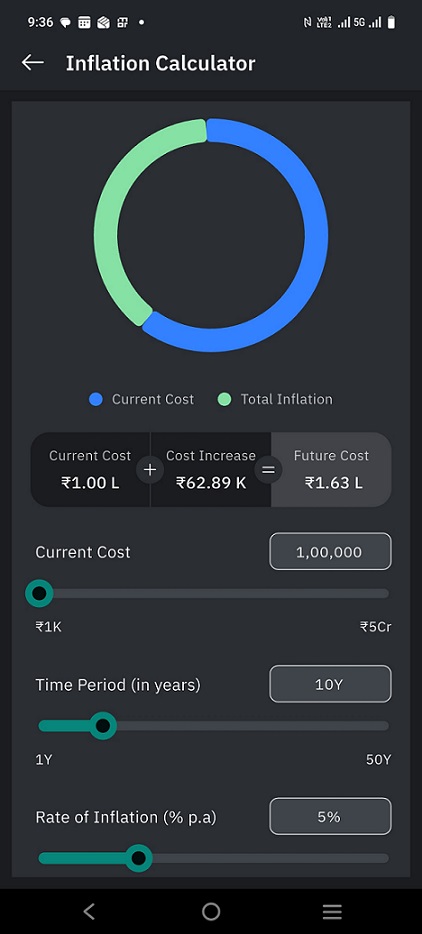
The Inflation Calculator helps you **estimate how the cost of an expense may increase over time due to inflation**. It shows the **future value of today’s cost**, helping you plan better for long-term goals such as education, healthcare, or other major expenses.
* Go to '**Dashboard**'.
* Scroll down to find '**Tools and Calculators**'.
* Tap on **'Inflation'** calculator.
#### Step-by-Step Process
#### Step 1: Enter Current Cost
* Enter the **present-day cost** of the expense you are planning for
* This could be education fees, medical expenses, or any other future goal.
* The selected amount is displayed clearly above the slider
#### Step 2: Select Time Period
* Choose the **number of years** after which the expense is expected to occur
* This represents how long inflation will impact the cost
#### Step 3: Set Inflation Rate
* Enter the **expected annual inflation rate (%)**
* This reflects how much the cost is assumed to increase every year
> For all inputs, you can either use the **slider** or **manually enter values**.\
> Entered values must be within the **minimum and maximum range shown**.
#### Understanding the Results
Below the chart, the following values are displayed:
* **Current Cost** – The cost today
* **Cost Increase** – The increase due to inflation over the selected period
* **Future Cost** – The estimated cost after accounting for inflation
These values update automatically whenever you change any input.
#### Example (Illustrative – Children’s Education)
Suppose the **current cost of your child’s college education** is **₹25,00,000** today.
* **Current Cost:** ₹25,00,000
* **Time Period:** 15 years
* **Expected Inflation Rate:** 6% per year
Using the Inflation Calculator:
* The **estimated future cost after 15 years** would be **approximately ₹60–65 lakh**.
This means an education expense that costs ₹25 lakh today may cost **more than double** in the future due to inflation.
> This example is for illustration purposes only. Actual costs and inflation rates may vary.
#### Important Notes
* Inflation rates are **assumptions**, not predictions
* The calculator provides **indicative estimates only**
* Results should be used for **planning and awareness**, not as guaranteed outcomes
Wealth Calculator
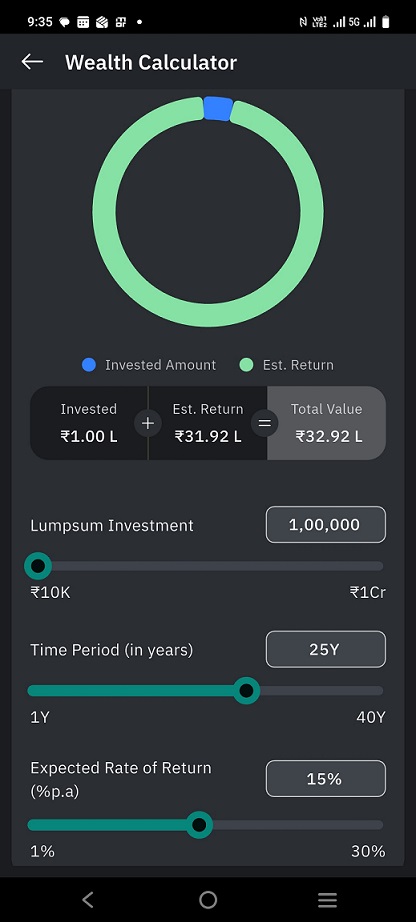
The Wealth Calculator helps you **estimate the future value of a one-time (lumpsum) investment** over a selected time period based on an assumed rate of return.\
It gives an indicative view of how a single investment can grow over time through compounding.
* Go to '**Dashboard**'.
* Scroll down to find '**Tools and Calculators**'.
* Tap on **'Wealth Calculator'**.
* When the calculator opens, the following **default values** are shown:
* **Lumpsum Investment Amount:** ₹1,00,000
* **Investment Time Period:** 25 years
* **Expected Return Rate:** 15% p.a.
These values are **for illustration purposes only** and can be modified.
* For all input fields in this calculator:
* You can either:
* Use the **slider**, or
* **Manually enter** the value
* Entered values must be within the **minimum and maximum range shown**
* The selected value is displayed clearly above the slider
* Any change made updates the calculation **instantly**
#### Step-by-Step Process
#### Step 1: Enter Lumpsum Investment Amount
* Enter the **one-time amount** you plan to invest
* This represents the total investment made at the start
#### Step 2: Select Investment Time Period
* Select the **number of years** you plan to stay invested
* This determines how long the investment is assumed to grow
#### Step 3: Set Expected Return Rate
* Enter the **expected annual rate of return (%)**
* This is an **assumed rate**, used only for estimation
#### Understanding the Results
The chart and figures below display:
* **Invested Amount** – The one-time amount invested
* **Estimated Return** – Indicative gains based on the assumed return rate
* **Total Value** – Sum of invested amount and estimated return
These values **change dynamically** as you adjust the inputs.
#### Important Notes
* Returns shown are **indicative and not guaranteed**
* Actual returns may vary based on market conditions
* This calculator does not account for taxes, exit loads, or inflation
* The tool is meant for **financial planning and awareness purposes only**
Retirement Calculator
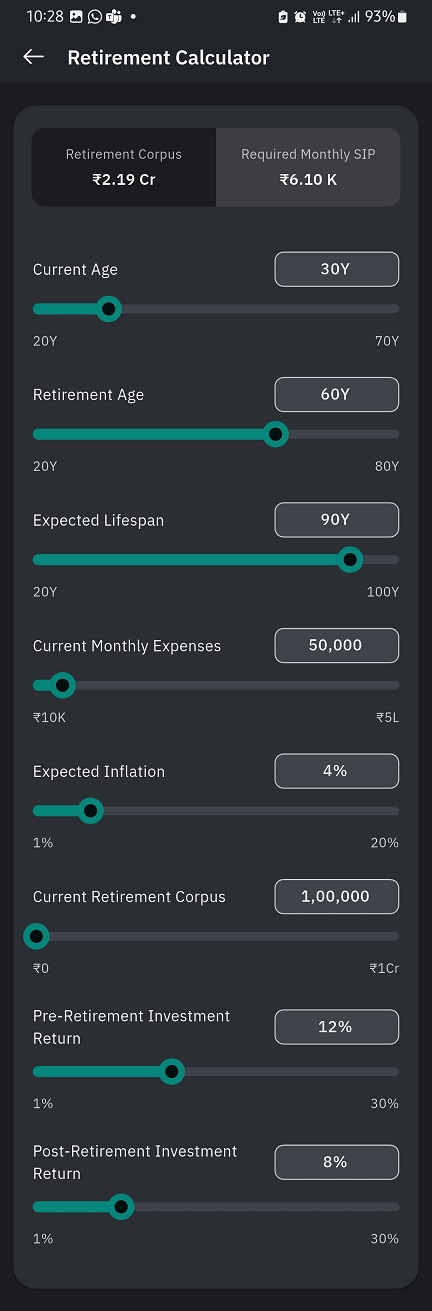
The **Retirement Calculator** helps you **estimate the monthly SIP required to build a retirement corpus needed to meet your post-retirement expenses**. It considers your current age, retirement age, expected lifespan, inflation (up to retirement), expected investment returns, and existing retirement savings to provide indicative estimates.
This calculator is for **illustration purposes only** and does not guarantee actual outcomes.
* Go to '**Dashboard**'.
* Scroll down to find '**Tools and Calculators**'.
* Tap on **'Retirement Calculator'.**
* When the calculator opens, the following **default values** are pre-filled:
* **Current Age:** 30 years
* **Retirement Age:** 60 years
* **Expected Lifespan:** 90 years
* **Current Monthly Expenses:** ₹50,000
* **Expected Inflation:** 4%
* **Current Retirement Corpus:** ₹1,00,000
* **Pre-Retirement Expected Return:** 12% p.a.
* **Post-Retirement Expected Return:** 8% p.a.
These default values are **only for illustration** and can be changed.
* For all input fields in this calculator:
* You can either:
* Use the **slider**, or
* **Manually enter** the value
* Entered values must remain within the **minimum and maximum range shown**
* Any change made updates the calculation **instantly**
#### Step-by-Step Process
#### Step 1: Enter Current Age
* Specify your current age
* This determines the number of years available for retirement planning
#### Step 2: Select Retirement Age
* Choose the age at which you plan to retire
* This defines the **pre-retirement investment period**
#### Step 3: Set Expected Lifespan
* Enter the age up to which you expect your retirement corpus to last
* This defines the **post-retirement period**
#### Step 4: Enter Current Monthly Expenses
* Enter your present monthly living expenses
* These expenses are **inflation-adjusted until the year of retirement**
#### Step 5: Set Expected Inflation Rate
* Enter the expected annual inflation rate
* **Inflation adjustment is applied only up to retirement**
* Post-retirement expenses are assumed to remain constant in real terms
#### Step 6: Enter Current Retirement Corpus
* Specify the amount already saved towards retirement
* This amount is considered while calculating the final retirement requirement
#### Step 7: Set Pre-Retirement Expected Return
* Enter the expected annual return during the accumulation phase
* This applies to investments made **before retirement**
#### Step 8: Set Post-Retirement Expected Return
* Enter the expected annual return during the withdrawal phase
* This applies to the retirement corpus **after retirement**
#### Understanding the Results
At the top of the screen, the calculator displays:
* **Retirement Corpus**\
The estimated total amount required at the time of retirement to support expenses till the expected lifespan
* **Required Monthly SIP**\
The estimated monthly investment required to build the retirement corpus, after considering current savings
All results update dynamically as inputs are modified.
#### Important Notes
* This calculator provides **indicative estimates only**
* It does not account for:
* Taxes
* Changes in lifestyle or future expenses
* Market volatility
* Inflation is adjusted **only until retirement**
* Actual retirement outcomes may differ from estimates
SIP Goal Calculator
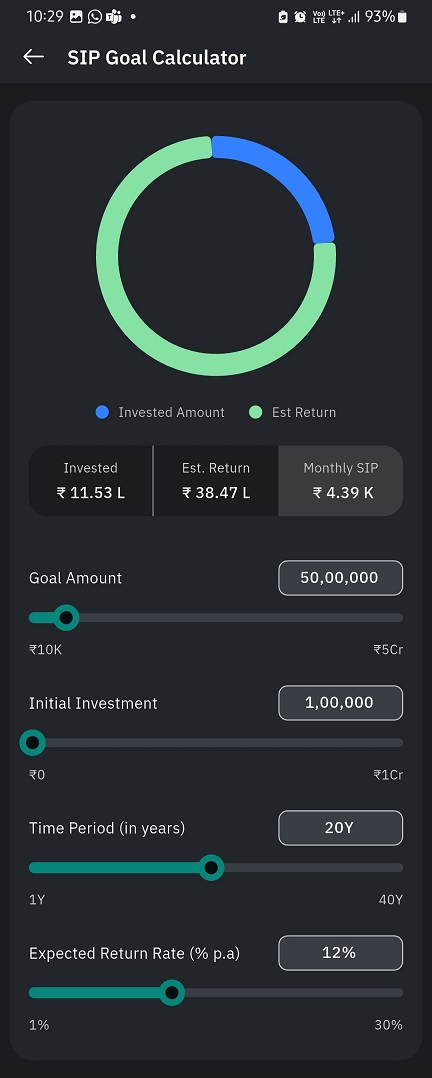
The **SIP Goal Calculator** helps you **estimate the monthly SIP required to achieve a specific financial goal** within a defined time period. It considers your target goal amount, any initial investment, expected returns, and investment duration to provide an indicative monthly SIP amount.
This calculator is for **illustration purposes only** and does not guarantee actual returns.
* Go to '**Dashboard**'.
* Scroll down to find '**Tools and Calculators**'.
* Tap on **'SIP Goal Calculator'.**
* When the calculator opens, the following **default values** are pre-filled:
* **Goal Amount:** ₹50,00,000
* **Initial Investment:** ₹1,00,000
* **Time Period:** 20 years
* **Expected Return Rate:** 12% p.a.
These default values are **only for illustration** and can be modified.
* For all input fields in this calculator:
* You can either:
* Use the **slider**, or
* **Manually enter** the value
* Entered values must remain within the **minimum and maximum range shown**
* Any change made updates the calculation **instantly**
#### Step-by-Step Process
#### Step 1: Enter Goal Amount
* Specify the total amount you want to accumulate for your goal
* This represents the **target value** to be achieved at the end of the selected period
#### Step 2: Enter Initial Investment (If Any)
* Enter any one-time amount you plan to invest at the beginning
* This amount reduces the monthly SIP required to reach the goal
#### Step 3: Select Investment Time Period
* Choose the number of years you plan to stay invested
* This represents the **goal duration**
#### Step 4: Set Expected Return Rate
* Enter the expected annual rate of return
* This is an **assumed rate used only for calculation**
* Actual returns may vary based on market conditions
#### Understanding the Results
Below the chart, the calculator displays:
* **Invested Amount**\
The total amount invested through SIP and initial investment
* **Estimated Return**\
The estimated gain based on the selected return rate
* **Monthly SIP**\
The estimated monthly investment required to achieve the goal amount
These values **update dynamically** as inputs are modified.
#### Important Notes
* This calculator provides **indicative estimates only**
* It does not account for:
* Taxes
* Exit loads
* Market volatility
* Expected returns are assumptions and not guarantees
* Actual investment outcomes may differ