> For the complete documentation index, see [llms.txt](https://usermanuals.geojit.com/llms.txt). Markdown versions of documentation pages are available by appending `.md` to page URLs; this page is available as [Markdown](https://usermanuals.geojit.com/flip-mobile/orders/time-conditions.md).
# Time Conditions
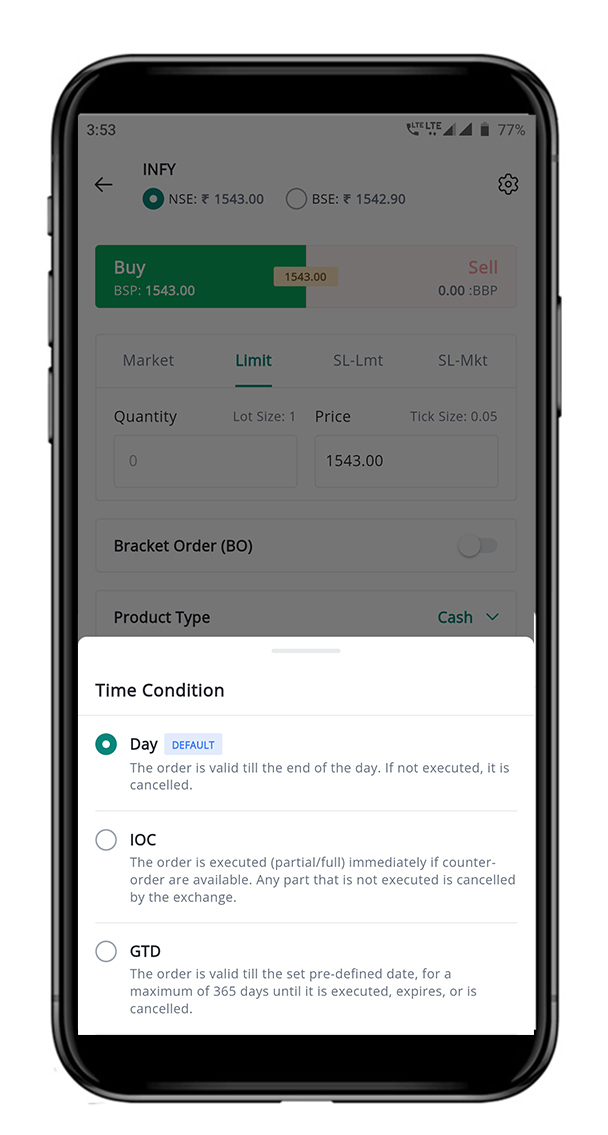
The following are the Time Conditions available in the FLIP App.
### This page contains:
1. [Day Order](#id-1.-day-order)
2. [Immediate or Cancel (IOC) Order](#id-2.-immediate-or-cancel-ioc-order)
3. [Good-Till-Date (GTD) Order](#id-3.-good-till-date-gtd-order)
4. [End Of Day (EOD) Order](#id-4.-end-of-day-eod-orders-coming-soon)
5. [Conditional Order](#id-5.-conditional-order-coming-soon)
### Various Order Time Conditions Available in FLIP App
### 1. Day Order
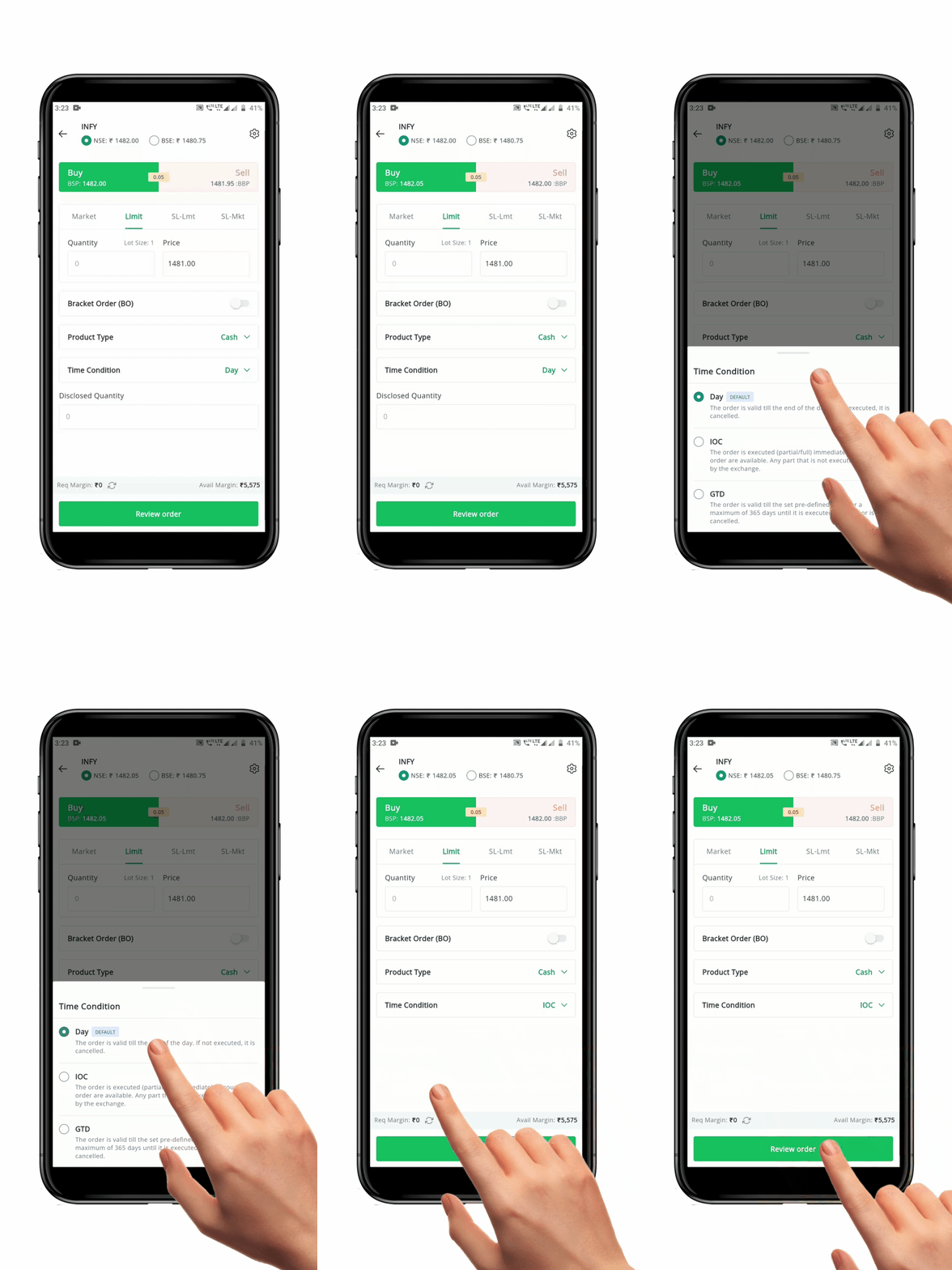
A **"**[**Day Order**](https://support.geojit.com/support/solutions/articles/89000007675-what-is-a-day-regular-order-)**"** is an Order Time Condition based on which a buy/sell remains valid. These orders remain valid until execution, till the end of the trading day.
#### How to place the Day Order
To place a **Day Order,** follow these steps:
* Open the **Order Placement Page** for the security you wish to buy or sell.
* Choose/enter the **"Exchange", "Order Type", "Quantity", "Price"** and **"Product Type".**
* Select the **Time Condition** as **"Day"**.
* Click the **"Review Order" Button** to re-check your order details.
* After confirmation, click the **"Place Order" Button.** Your order will be sent to the exchange.
**Please Note:** If the *Day Order* is not executed by end of the day, it will be automatically canceled.
### 2. Immediate or Cancel (IOC) Order
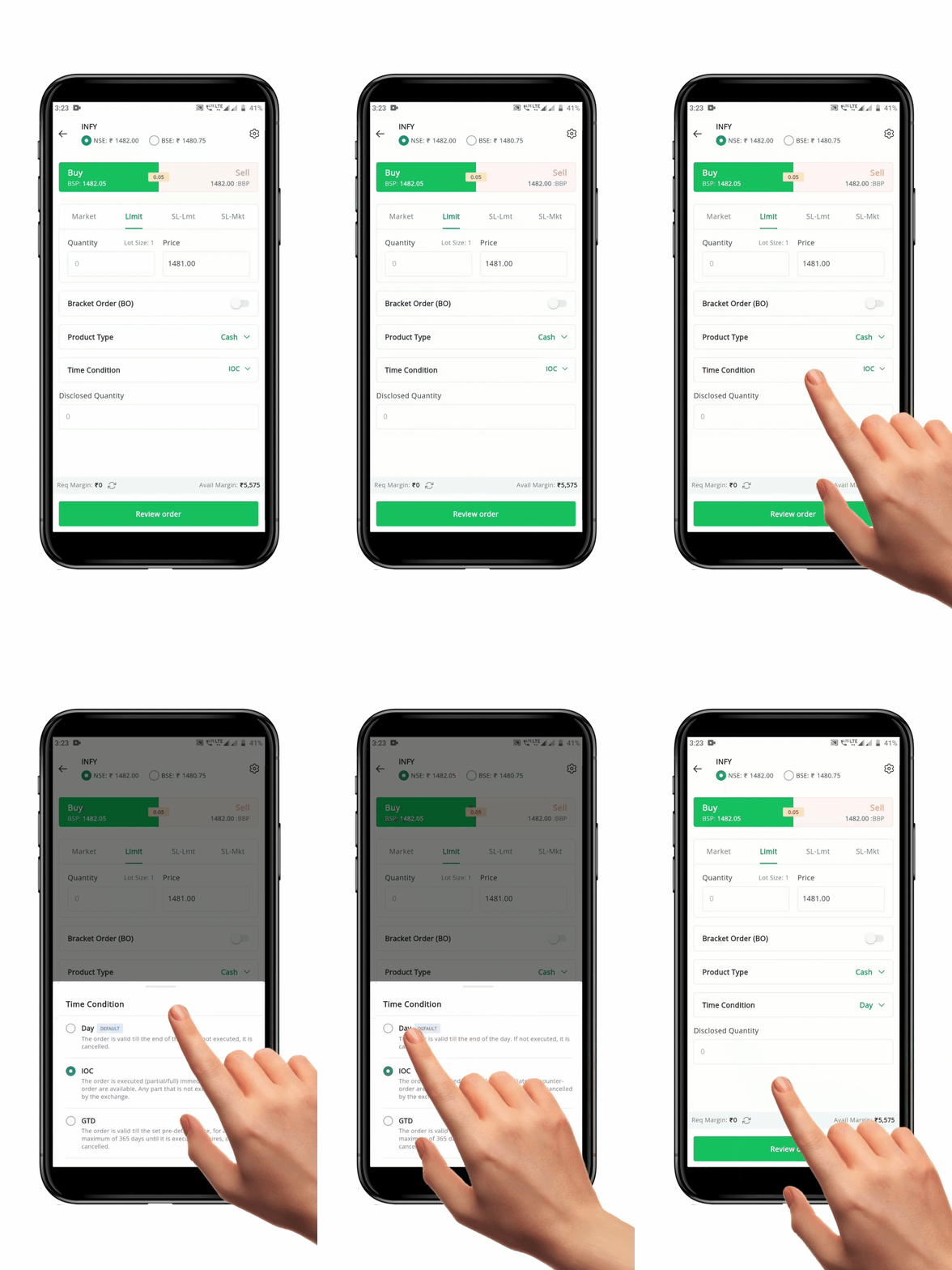
An **"**[**Immediate or Cancel Order (IOC) Order**](https://support.geojit.com/support/solutions/articles/89000007775-what-is-an-immediate-or-cancel-ioc-order-)**"** is an Order Time Condition that allows you to buy/sell a security as soon as the order is sent to the Market. **IOC Orders** are executed (partial/full) immediately if counter-orders are available. Any part that is not immediately executed is canceled by the exchange. They are usually used while placing orders of large quantities and the client doesn’t want it to be executed at different prices.
#### How to place the IOC Order
To place a **IOC Order,** follow these steps:
* Open the **Order Placement Page** for the security you wish to buy or sell.
* Choose/enter the **"Exchange", "Order Type", "Quantity", "Price"** and **"Product Type"**.
* Select the **Time Condition** as **"IOC".**
* Click the **"Review Order" Button** to re-check your order details.
* After confirmation, click the **"Place Order" Button**. Your order will be sent to the exchange.
### 3. Good Till Date (GTD) Order
A **"**[**Good Till Date (GTD) Order**](https://support.geojit.com/support/solutions/articles/89000007731-what-is-a-good-till-date-gtd-order-how-does-it-work-)**"** is an Order Time Condition wherein an order remains active till a pre-defined date. These orders can be kept active for a maximum of 365 calendar days until it is *executed, expires,* or is *cancelled.* The **GTD** order facility is only available for the *equity/cash* segment.
**GTD Orders** can be useful for traders who have a specific Target Price or Market event in mind, but don't want to have to constantly monitor their trade. The order will remain open until it is either executed or the specified *expiry date* arrives, at which point it will be automatically *canceled.*
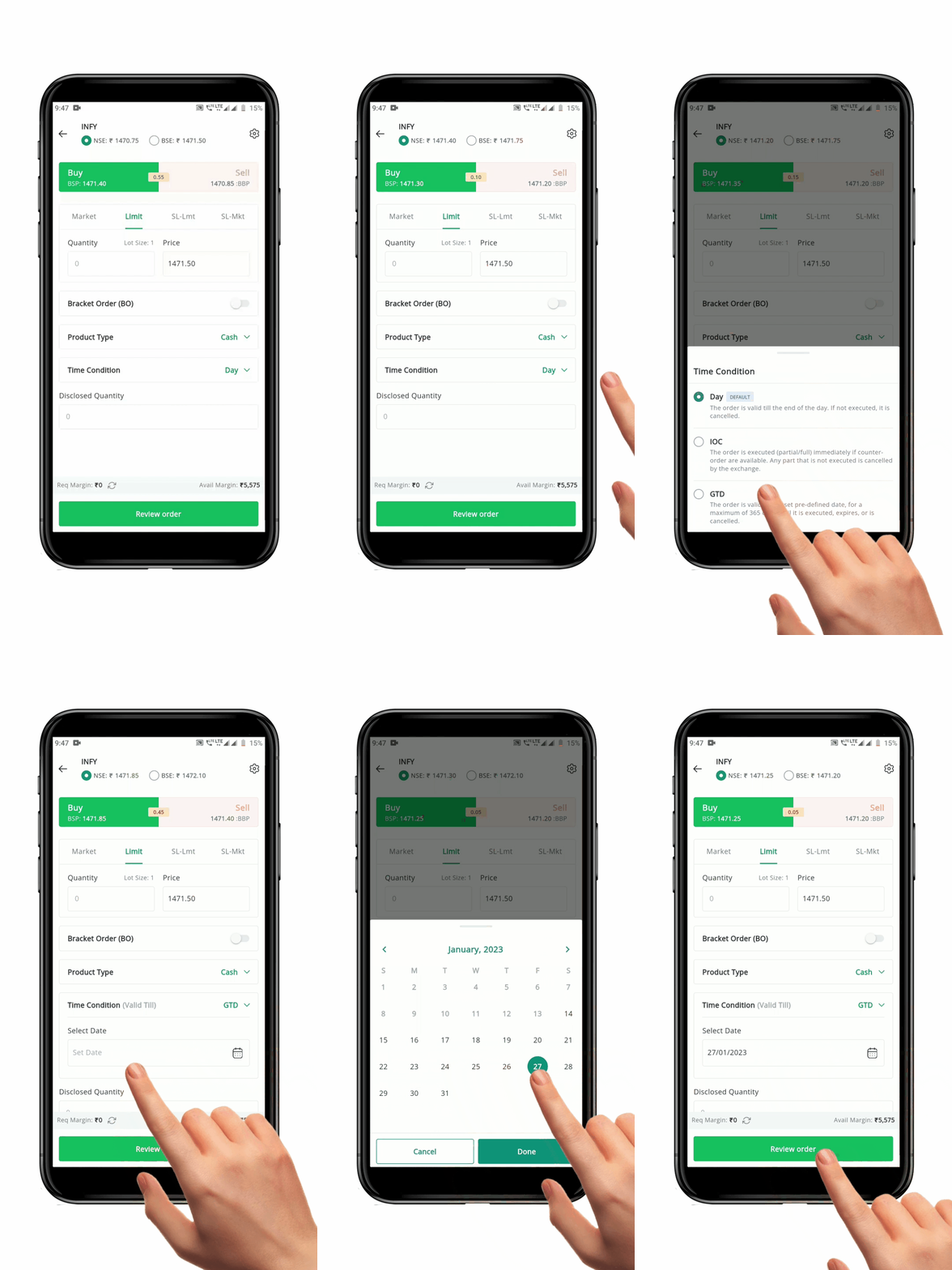
#### How to place the GTD Order
To place a **GTD Order,** follow these steps:
* Open the **Order Placement Page** for the security you wish to buy or sell
* Choose/enter the **"Exchange", "Order Type", "Quantity", "Price"** and **"Product Type".**
* Select the **Time Condition** as **"GTD".**
* Select the desired **"Validity Date".**
* Click the **"Review Order" Button** to re-check your order details.
* After confirmation, click the **"Place Order" Button**. Your order will be sent to the exchange.
**Please Note:** There is no guarantee that a *GTD* order will be executed, as market conditions can change and prevent the trade from occurring [(Read GTD T\&C)](https://login.geojit.com/authorize?redirect_uri=https%3A%2F%2Fmy.geojit.com%2F%23%2Fsso\&client_id=01ede5bf-a7a0-1e11-9a81-5f83633164ae\&response_type=code).
#### FAQ
1. What is the [validity for GTD order](https://support.geojit.com/support/solutions/articles/89000007739-what-is-the-validity-for-gtd-orders-)?
2. How do I [activate GTD order](https://support.geojit.com/support/solutions/articles/89000007733-how-do-i-activate-the-gtd-order-facility-) facility?
3. Where can I [view my GTD order?](https://support.geojit.com/support/solutions/articles/89000007736-where-can-i-view-the-details-of-my-gtd-order-)
4. Can I place [GTD order in market price?](https://support.geojit.com/support/solutions/articles/89000007745-can-i-place-a-gtd-order-at-the-market-price-)
5. Can I place [GTD order after market hours?](https://support.geojit.com/support/solutions/articles/89000007749-can-i-place-gtd-orders-after-market-hours-)
6. Can I place a [GTD order if I am not a PoA client? ](https://support.geojit.com/support/solutions/articles/89000007734-can-i-place-a-gtd-order-if-i-am-not-a-poa-ddpi-client-)
### 4. End Of Day (EOD) Orders *(COMING SOON!)*
An **"**[**End of Day (EOD) Order**](https://support.geojit.com/support/solutions/articles/89000010139-what-is-an-end-of-day-eod-order-)**"** is an **Order Time Condition** available on BSE. **EOD Orders** are valid until the *end of the trading day* on which it is placed. In other words, it is valid for both the normal trading session from 9:15 a.m. to 3:30 p.m., and the post-closing session from 3:40 p.m. to 4:00 p.m.
| Exchange | Time Condition | Order Validity |
| -------- | -------------- | ---------------------- |
| NSE | Day | 9:15 a.m. - 4:00 p.m. |
| NSE | EOD | NA |
| BSE | DAY | 9:15 a.m. - 3:30 p.m. |
| BSE | EOD | 9: 15 a.m. - 4:00 p.m. |
#### How to place an EOD Order
* Open the **Order Placement Page** for the security you wish to buy or sell.
* Choose/enter the **"Exchange", "Order Type", "Quantity", "Price"** and **"Product Type".**
* Select the **Time Condition** as **"EOD"**.
* Click the **"Review Order" Button** to re-check your order details.
* After confirmation, click the **"Place Order" Button**. Your order will be sent to the exchange.
### 5. Conditional Order *(COMING SOON!)*
A **"Conditional Order"** is an Order Time Condition for the *F\&O segment* wherein an Order is sent to the exchange when the *Trigger Price* set for the underlying is hit. This **Time Condition** is only valid for **NIFTY** and **BANKNIFTY** Options Contracts.
#### How to place the Conditional Order
To place a **Conditional Order,** follow these steps:
* Open the **Order Placement Page** for a **NIFTY or BANKNIFTY** Options Contract you wish to buy or sell.
* Choose/enter the **"Exchange", "Order Type", "Quantity","Price"** and **"Product Type".**
* Select the **Time Condition** as **"Conditional".**
* Select the desired **"Condition Type"** and enter the required details.
* Select the desired **"Validity Date".**
* Click the **"Review Order" Button** to re-check your order details.
* After confirmation, click the **"Place Order" Button**. Your order will be sent to the exchange.