> For the complete documentation index, see [llms.txt](https://usermanuals.geojit.com/llms.txt). Markdown versions of documentation pages are available by appending `.md` to page URLs; this page is available as [Markdown](https://usermanuals.geojit.com/flip-mobile/orders/product-types.md).
# Product Types
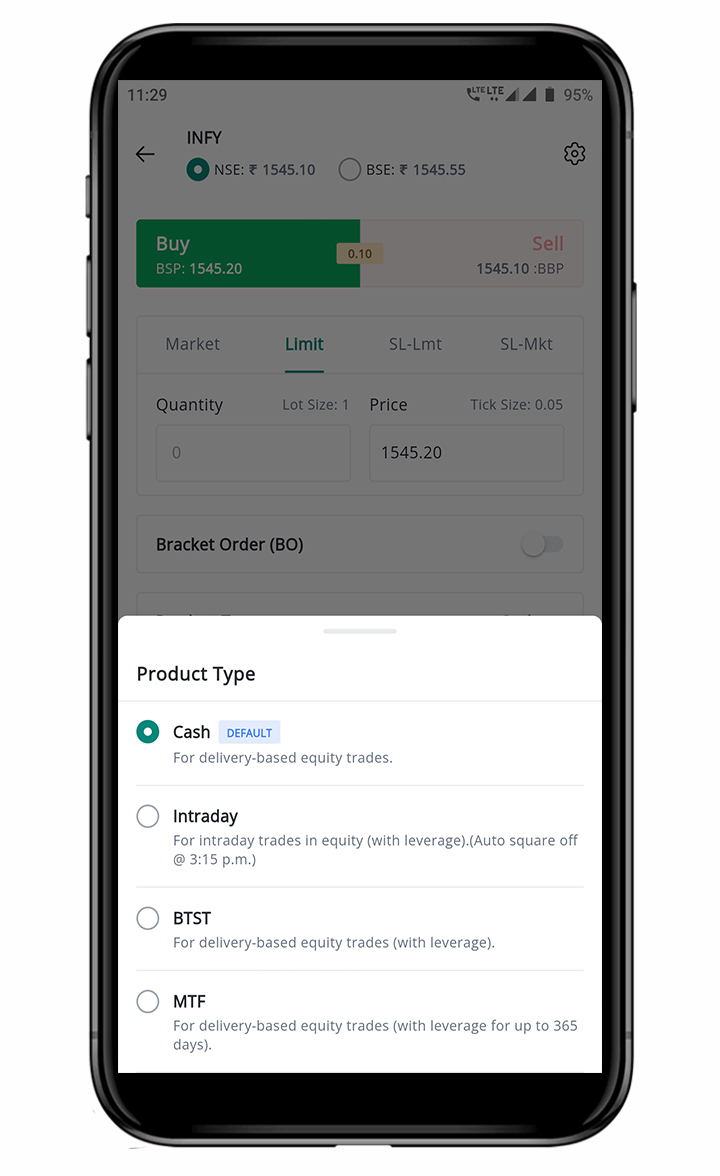
The following are the Product Types available in the FLIP App.
### This section contains:
1. [Cash Order](#id-1.-cash-order)
2. [Intraday Order](#how-to-place-the-cash-order)
3. [Buy Today Sell Tomorrow Order](#id-3.-buy-today-sell-tomorrow-btst-order)
4. [Margin Trading Funding Order](#id-4.-margin-trading-funding-mtf-order)
### Various Product Types Available in FLIP App
### 1. Cash Order
A **"**[**Cash Order**](https://support.geojit.com/support/solutions/articles/89000007678-what-is-a-cash-order-)**"**, also known as a **"Delivery Order"**, is an **Order Product Type** that involves taking/giving physical delivery of a security in a *buy/sell* transaction.
#### How to place the Cash Order
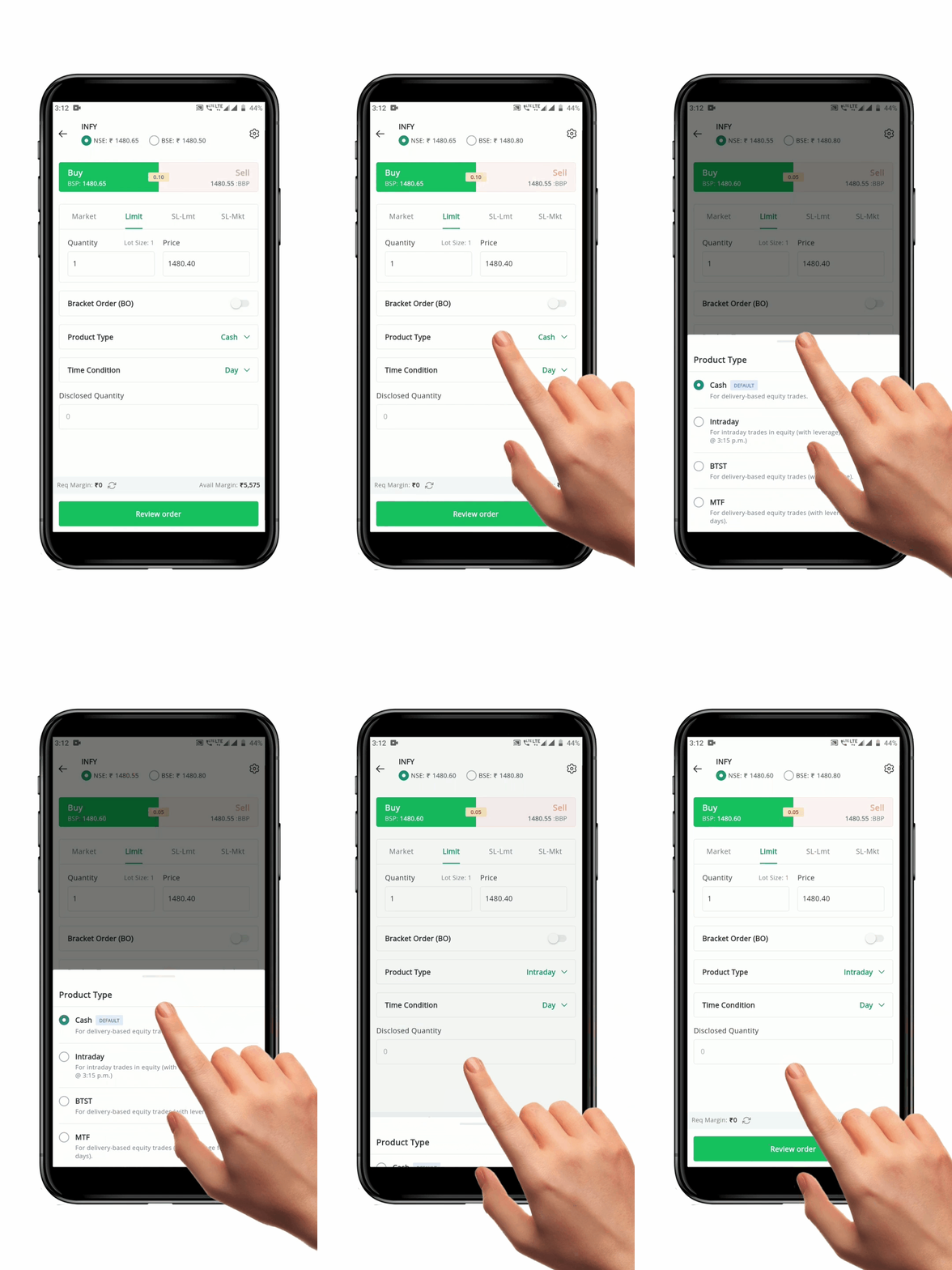
To place a **Cash Product Order,** follow these steps:
* Open the **Order Placement Page** for the security you wish to buy or sell.
* Select the **"Exchange"** and **"Order Type".**
* Enter the **"Quantity"** and **"Price".**
* Select the **Product Type** as **"Cash".**
* Select the **"Time Condition"**.
* Click the **"Review Order" Button** to re-check your order details.
* After confirmation, click the **"Place Order" Button**. Your order will be sent to the exchange.
**Please Note:** To place a Cash Order, you will need to have 100% of the order value as margins. This margin can be in the form of Cash or a Pledge Margin.
### 2. Intraday Order
An **"**[**Intraday Order**](https://support.geojit.com/support/solutions/articles/89000007657-what-is-an-intraday-order-)**"** is an order product wherein any position taken during the day is [**Squared Off** ](https://support.geojit.com/support/solutions/articles/89000007438-what-is-the-auto-square-off-timing-for-intraday-positions-)before the close of trading hours on the same day. The security is bought and sold on the same day and delivery is not taken.
#### How to place the Intraday Order
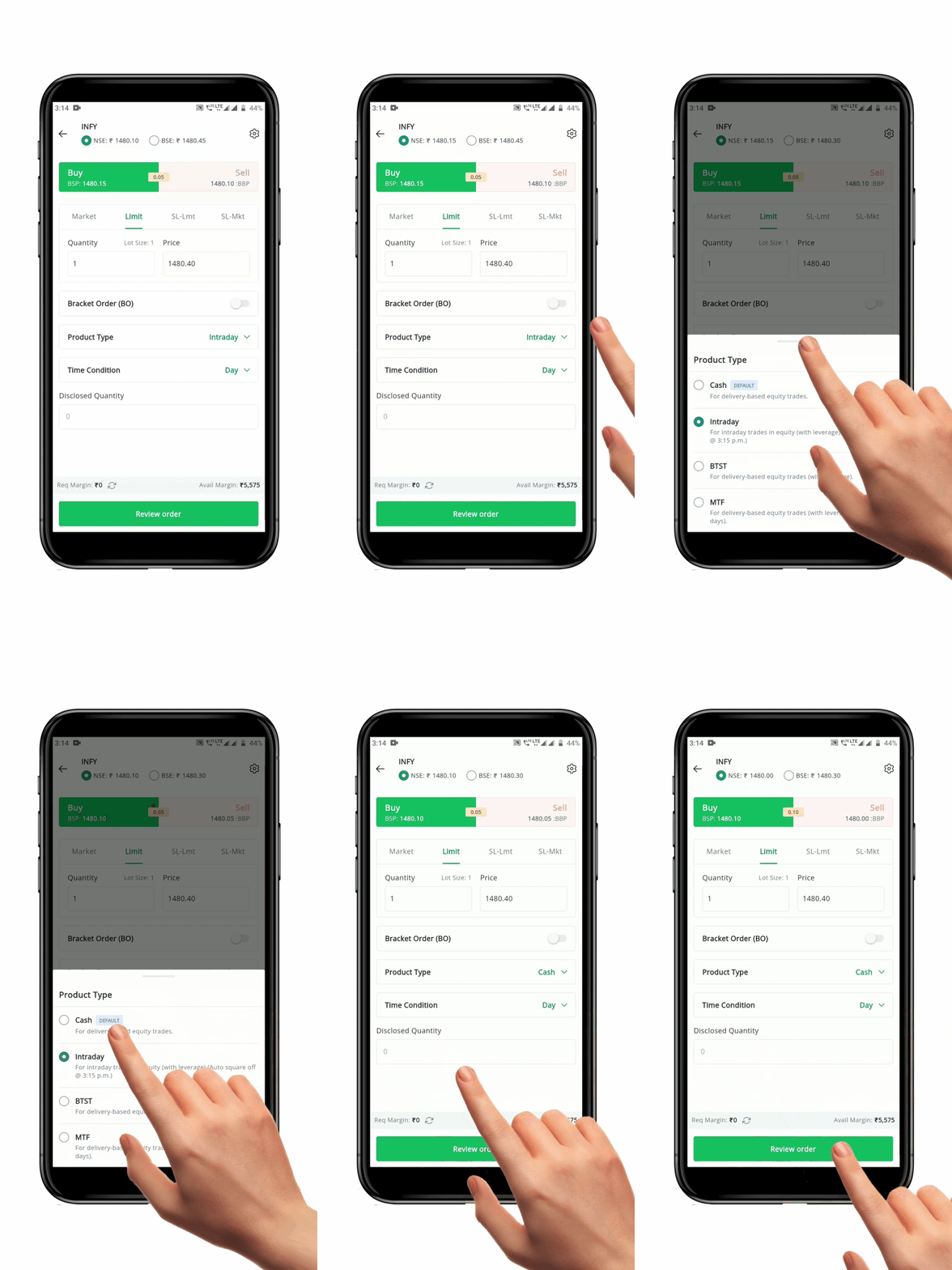
To place an **Intraday Order**, follow these steps:
* Open the **Order Placement Page** for the security you wish to buy or sell.
* Select the **"Exchange"** and **"Order Type".**
* Enter the **"Quantity"** and **"Price".**
* Select the **Product Type** as **"Intraday"**.
* Select the **"Time Condition"**.
* Click the **"Review Order" Button** to re-check your order details
* After confirmation, click the **"Place Order" Button.** Your order will be sent to the exchange.
**Please Note:** An Intraday Order must be closed/squared off/converted by 3:15 pm.
#### **FAQ**
1. What is auto [square-off timing ](https://support.geojit.com/support/solutions/articles/89000007438-what-is-the-auto-square-off-timing-for-intraday-positions-)for Intraday position??
2. What is the margin/fund required for [Intraday Trade?](https://support.geojit.com/support/solutions/articles/89000007605-what-are-the-margin-fund-requirements-for-an-intraday-trade-)
3. What will happen if I don't close my [Intraday Position?](https://support.geojit.com/support/solutions/articles/89000007430-what-will-happen-if-i-don-t-close-my-intraday-position-)
4. What is the cut-off time to place an [Intraday Order?](https://support.geojit.com/support/solutions/articles/89000007674-what-is-the-cut-off-time-to-place-intraday-orders-)
5. What happens after I close my [Intraday position?](https://support.geojit.com/support/solutions/articles/89000007432-what-happens-after-i-close-my-intraday-positions-)
### 3. Buy Today Sell Tomorrow (BTST) Order
**"**[**BTST or Buy Today Sell Tomorrow**](https://support.geojit.com/support/solutions/articles/89000007760-what-is-a-buy-today-sell-tomorrow-btst-order-)**"** is an **Order Product Type** that allows you to place a buy order and sell it before settlement. This allows you to take advantage of short-term market movements and potentially make profits without having to pay for the entire amount for the trade upfront.
The **"BTST"** leveraged product offered by **Geojit** as a way for clients to carry forward their *cash/delivery* purchases by only paying a margin. You can carry a position forward for up to *seven* calendar days, after which it will be closed (T+7th calendar day).
#### How to place the BTST Order
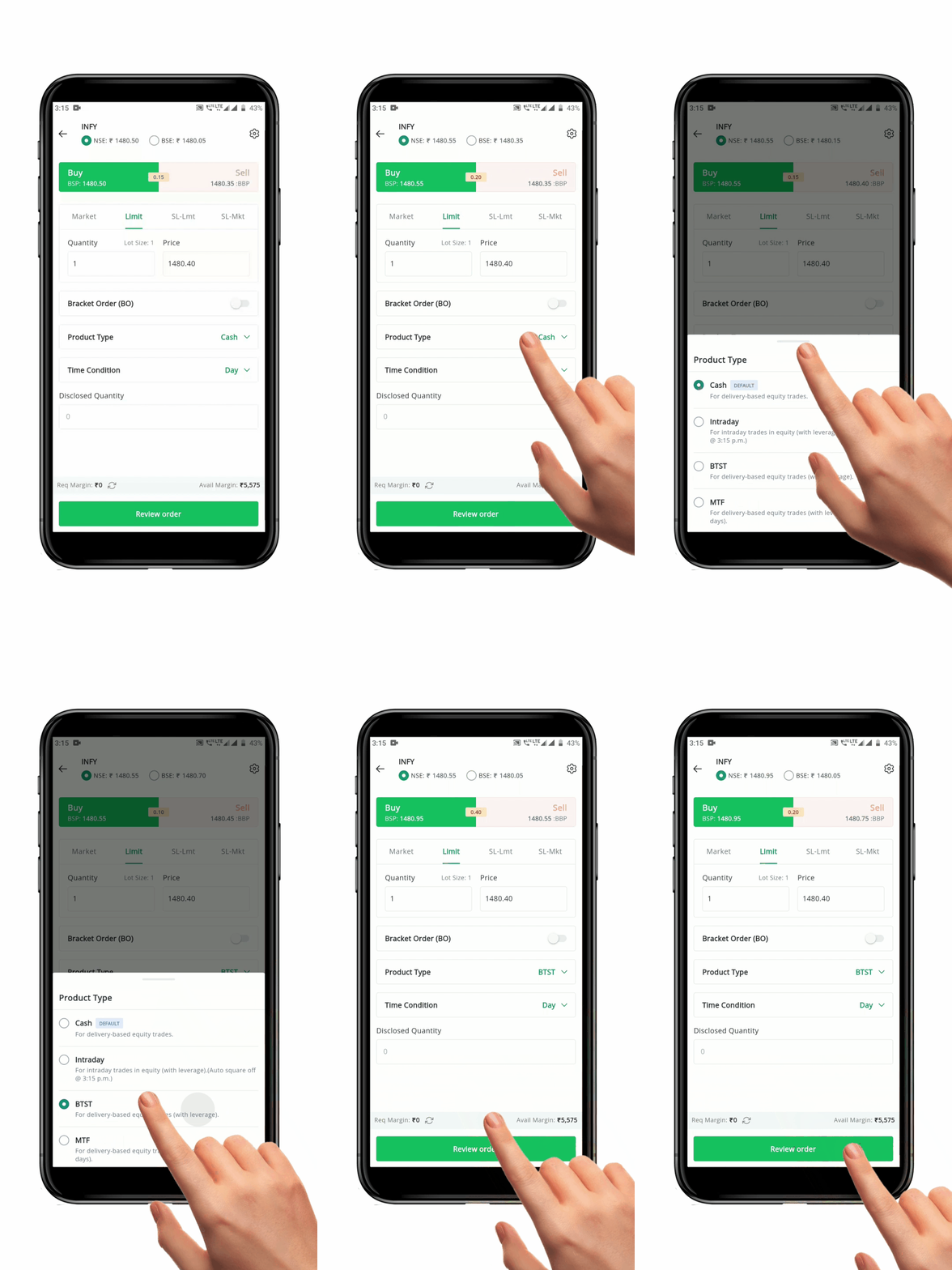
To place a **BTST Order**, follow these steps:
* Open the **Order Placement Page** for the security you wish to buy or sell.
* Select the **"Exchange"** and **"Order Type"**.
* Enter the **"Quantity"** and **"Price"**.
* Select the **Product Type** as **"BTST"**.
* Select the **"Time Condition".**
* Click the **"Review Order" Button** to re-check your order details.
* After confirmation, click the **"Place Order" Button**. Your order will be sent to the exchange.
#### **FAQ**
1. Who can use [BTST facility](https://support.geojit.com/support/solutions/articles/89000007763-who-can-use-the-btst-order-facility-)?
2. Do we have to activate [BTST order facility?](https://support.geojit.com/support/solutions/articles/89000007765-do-i-have-to-activate-the-btst-order-facility-)
3. Are there risks involved in using [BTST order?](https://support.geojit.com/support/solutions/articles/89000007767-are-there-risks-involved-in-using-btst-orders-)
### 4. Margin Trading Funding (MTF) Order
**"**[**Margin Trading Funding**](https://support.geojit.com/support/solutions/articles/89000007803-what-is-margin-trading-funding-mtf-)**" (MTF)** is a facility that allows you to capitalize on investment opportunities that may otherwise not be possible due to a shortage of Funds. By paying for a part of the order value in the form of a margin, the remaining amount will be funded by Geojit.
#### How to place the Margin Trading Funding Order
To place a **MTF Order**, follow these steps:
* Open the **Order Placement Page** for the security you wish to buy or sell.
* Select the **"Exchange"** and **"Order Type."**
* Enter the **"Quantity"** and **"Price."**
* Select the **product type** as **"MTF."**
* If MTF is not activated in your trade code, then you will **receive a pop-up message** prompting you to activate MTF.
* Click on the '**Activate MTF**' button.
* You will get a success pop.
* Once the MTF facility is activated successfully, you now can place the MTF order instantly.
* Next, select the **"Time Condition."**
* Click the **"Review Order" Button** to recheck your order details
* After confirmation, click the **"Place Order" button.** Your order will be sent to the exchange.
#### **FAQ**
1. How do I activate [MTF facility?](https://support.geojit.com/support/solutions/articles/89000007826-how-do-i-activate-the-mtf-facility-)
2. How do I exit [MTF position?](https://support.geojit.com/support/solutions/articles/89000007914-how-do-i-exit-an-mtf-position-)
3. What are the [margin requirement for MTF?](https://support.geojit.com/support/solutions/articles/89000007915-what-are-the-margin-requirements-for-mtf-)
4. What should I do after I [place my MTF order?](https://support.geojit.com/support/solutions/articles/89000007887-what-should-i-do-after-i-place-my-mtf-order-)
5. Where can I view my [open MTF position?](https://support.geojit.com/support/solutions/articles/89000007888-where-can-i-view-my-open-mtf-positions-)
6. What is [MTF square-off policy?](https://support.geojit.com/support/solutions/articles/89000007916-what-is-the-mtf-square-off-policy-)