> For the complete documentation index, see [llms.txt](https://usermanuals.geojit.com/llms.txt). Markdown versions of documentation pages are available by appending `.md` to page URLs; this page is available as [Markdown](https://usermanuals.geojit.com/flip-mobile/more/profile.md).
# Profile
Provides Client details
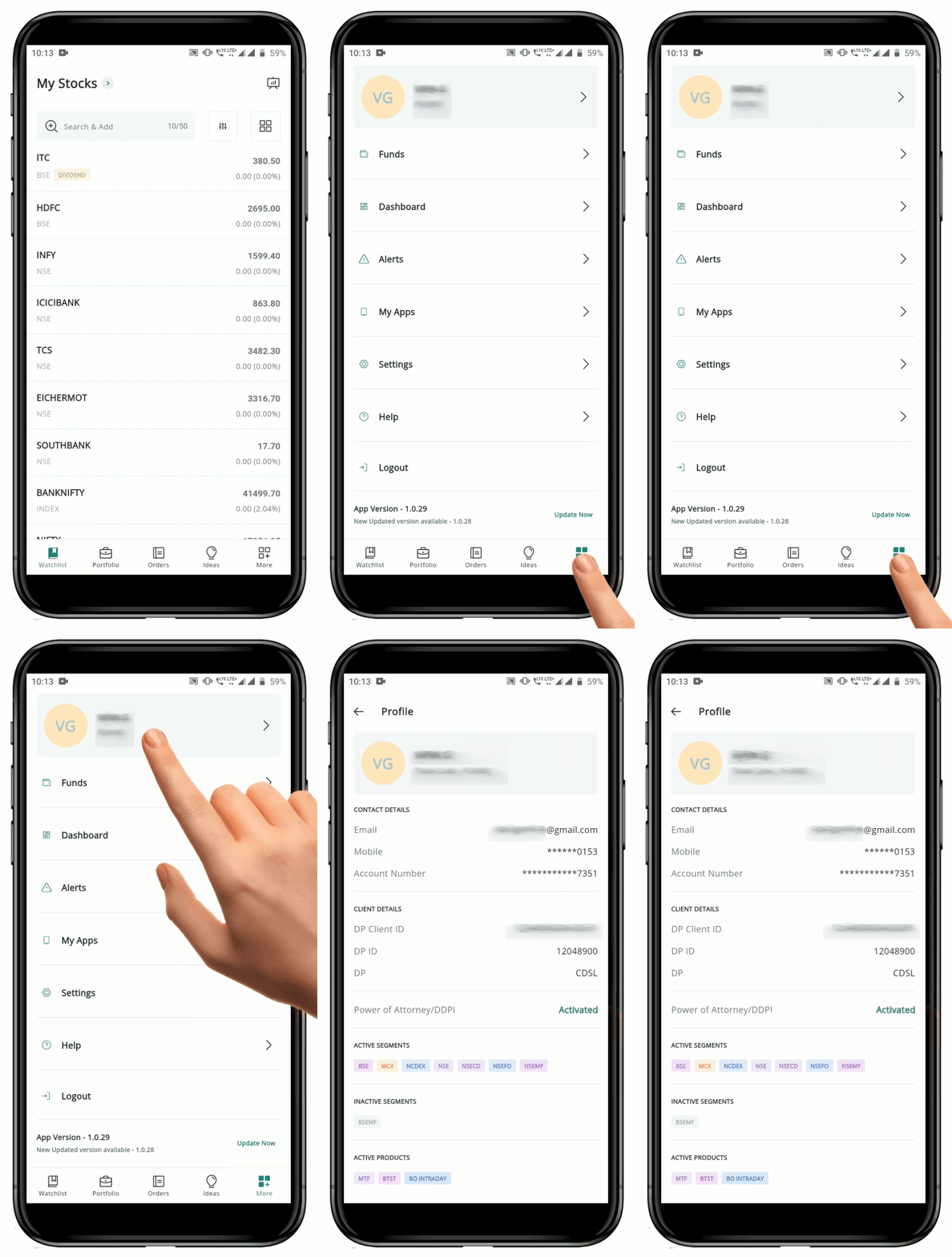
Your complete **"Profile"** details such as **Contact Details, Bank Details, Client Details, Power of Attorney Status,** and **Active & Inactive Segments and Products** are displayed here.
### How to open the Profile page
To open the **"Profile"** page, follow these steps:
* Locate the **"More" Icon** at the bottom of the page.
* Click on the **"More" Icon**
at the bottom of the page.
* Click on the **"More" Icon** to go to the **More page.**
* You can see your **"Name"** and **"Trade Code"** at the top of the page.
* Click on your **Name / "Arrow" Icon**
to go to the **More page.**
* You can see your **"Name"** and **"Trade Code"** at the top of the page.
* Click on your **Name / "Arrow" Icon** at the left-hand side**.**
* This will redirect you to the **"Profile" page**.
* Click on the **"Back Arrow" Icon**
at the left-hand side**.**
* This will redirect you to the **"Profile" page**.
* Click on the **"Back Arrow" Icon** at the top-right hand side to go back to the **More page.**
* You can see details like your - registered email, mobile number, account number, customer ID, DP client ID, DP ID, DP, UCC, **password expiry**, KRA status, PoA/DDPI, active segments, inactive segments, active products and inactive products.
at the top-right hand side to go back to the **More page.**
* You can see details like your - registered email, mobile number, account number, customer ID, DP client ID, DP ID, DP, UCC, **password expiry**, KRA status, PoA/DDPI, active segments, inactive segments, active products and inactive products.